Guide
Midjourney v8 vs. Flux 2 Pro vs. GPT Image 2: Which Model Should You Actually Use in 2026?
No single AI model is “best” in 2026—each excels in different tasks. This guide shows when to use Midjourney v8, Flux 2 Pro, or GPT Image 2 based on your workflow needs.
Published May 1, 2026
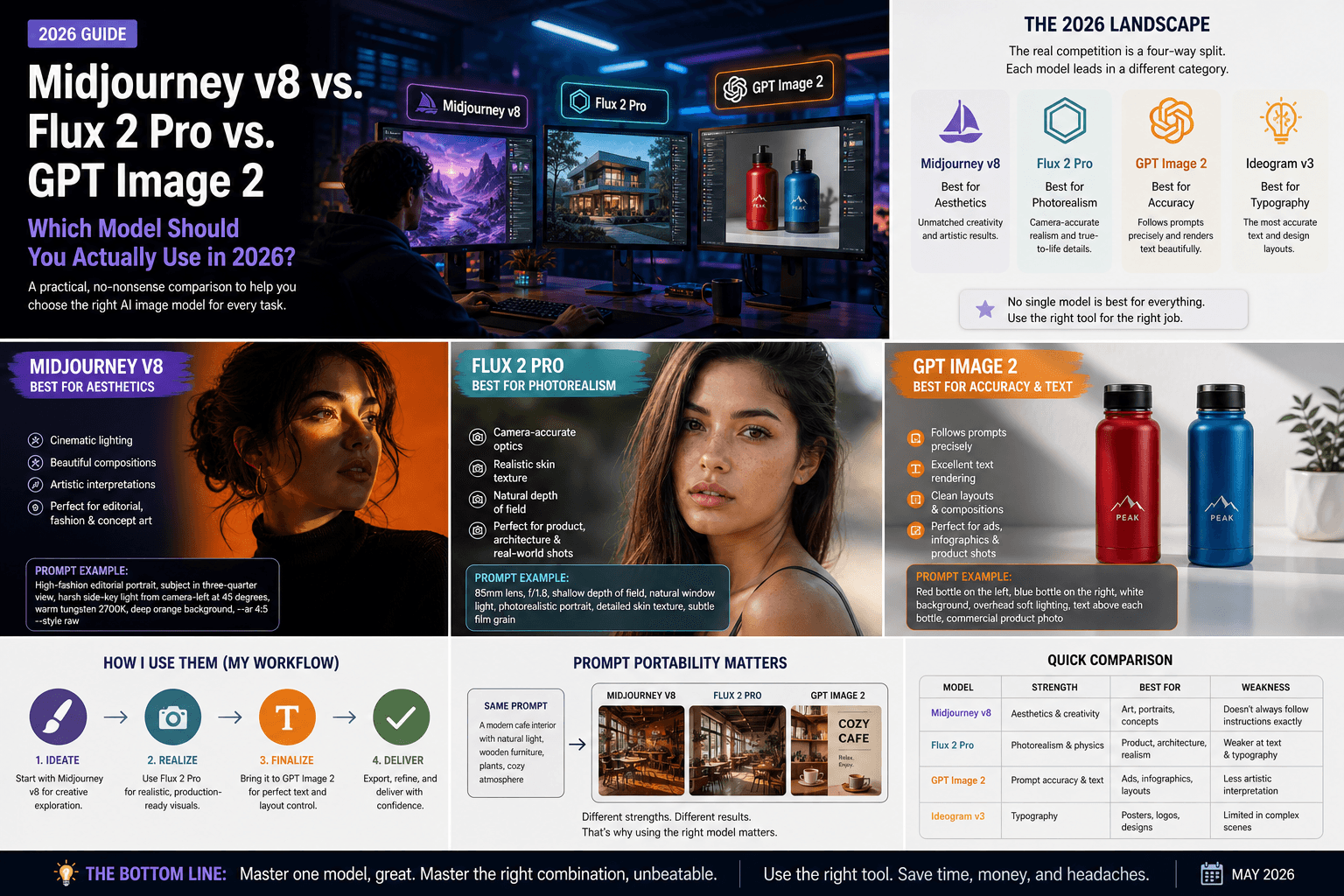
I spent three weeks in early 2026 running the same 40 prompts through every major image model I could get my hands on. Not cherry-picked showcase prompts. Real working prompts — editorial portraits, product mockups, cinematic stills, social graphics with text. What I found completely changed how I structure my workflow, and probably not in the way you'd expect.
The honest answer to "which model is best" in 2026 is: none of them. Each one wins a different fight. The problem is that most guides pick a winner and move on, which is useless if you're trying to actually produce work.
So here is what I use, when I use it, and why.
The Landscape Right Now (It's Not What You Think)
Most coverage still frames this as a Midjourney vs. DALL-E debate. That framing is about two years out of date.
The current competitive set is Midjourney v8 for aesthetics, GPT Image 2 for prompt accuracy, Flux 2 Pro for photorealism, and Ideogram v3 for text inside images. These are not interchangeable. They are genuinely different tools with different architectural priorities, and using the wrong one for a job is the fastest way to burn your generation budget chasing results you will never get.
Midjourney v8: Still the Best "Art Director in a Box"
Midjourney v8 Alpha — launched March 2026 — added native 2K resolution and generation speeds roughly 4–5× faster than v7. I tested the alpha for about ten days, and the quality jump is real. Portraits especially. The skin rendering, the cinematic light falloff, the way it handles dark ribbed fabrics against deep backgrounds — nothing else matches it aesthetically out of the box.
But here is the trade-off I keep running into: Midjourney interprets your prompt rather than follows it.
If I write "woman standing on the left side of the frame, man sitting on the right," Midjourney will produce something beautiful that may or may not respect that spatial instruction. It has an aesthetic opinion, and that opinion will occasionally override yours. For editorial and fine art work, that's a feature. For commercial briefs where a client needs specific compositions, it is genuinely frustrating.
My use case for it: Fashion shoots, cinematic concept art, editorial portraits, anything where I want the output to look like it came from a $5,000-a-day photographer.
Example prompt that works well here:
High-fashion editorial portrait, subject positioned in dynamic three-quarter view, harsh side-key light from camera-left at 45 degrees casting deep diagonal shadow across right side of face, warm tungsten source 2700K, deep orange seamless background, dark ribbed turtleneck, medium format aesthetic, --ar 4:5 --style raw
Flux 2 Pro: For When Physics Has to Be Right
Flux 2 Pro produces images with camera-accurate optical characteristics — depth of field, lens distortion, chromatic aberration, film grain — that respond precisely to photography-specific prompts. When I write "85mm, f/1.8, shallow depth of field," Flux actually behaves like that optical setup. Midjourney will produce something that looks shallow-focus. Flux will produce something that is shallow-focus, correctly.
For product photography, architectural shots, and any brief that requires photorealistic human skin at close range, Flux 2 Pro is where I go first.
The Flux.1 Schnell variant has captured roughly 40% of API-based image generation traffic — largely because developers love the permissive licensing and the ability to self-host at scale. If you are building a content pipeline rather than producing individual images, the economics of Flux are hard to argue with.
The weakness: it lacks Midjourney's aesthetic instinct. Give Flux a vague prompt and you get a competent, flat result. It rewards precision and punishes ambiguity.
GPT Image 2: The Model That Actually Does What You Say
GPT Image 2 excels at following complex, multi-element prompts exactly — and its text rendering is reliable enough for signs, labels, UI mockups, and marketing banners.
I use it specifically for two things: social graphics where I need readable text in the image, and any compositionally complex scene where spatial relationships matter. Red product on the left, blue product on the right, white background, overhead lighting — GPT Image 2 executes that literally. The others treat it as a suggestion.
The limitation is that it lacks personality. The outputs look competent and technically accurate, but rarely beautiful in the way Midjourney is. For client deliverables that need to clear a brand approval process, that reliability is worth the aesthetic tradeoff.
The Decision Framework I Actually Use
I stopped asking "which model is best" and started asking "what does this specific job require." Here is the rough logic I follow:
- Client needs gallery-quality aesthetics, composition is flexible → Midjourney v8
- Photorealistic product or portrait shot, precise optical control needed → Flux 2 Pro
- Complex multi-element composition, spatial accuracy required, or text in image → GPT Image 2
- Brand assets with typography as a design element → Ideogram v3
Most of my projects now run through two models minimum. I'll use Midjourney to establish the visual mood and composition, then re-prompt in Flux when a client needs photorealistic versions of the same shot. It adds maybe fifteen minutes to a job and removes an entire round of client revisions.
A Note on Prompt Portability
One thing I have learned the hard way: prompts do not transfer cleanly between models. A highly tuned Midjourney prompt that uses --sref for style reference and --cref for character reference will produce garbage if you paste it into Flux's API. The syntax is different, the weighting system is different, and the way each model interprets adjectives differs fundamentally.
This is actually why I built AIPromptHub — every prompt in the gallery is tested on the specific model it is listed under, with the expected output documented so you know what you are actually getting before you spend credits. If you are moving between models and want a reliable starting point, that is the fastest way to avoid the prompt porting headache.
Conclusion
There is no single best model in 2026. There is only the right model for the job you are doing right now.
If I had to pick one for a complete beginner with no specific use case: start with GPT Image 2. The prompt adherence means your early experiments will actually reflect what you intended, which makes the learning process far less demoralizing. Once you understand what you are asking for, move to Midjourney for aesthetics and Flux for realism.
Browse the AIPromptHub gallery to see tested, working examples for each model — including the exact prompt syntax that produced each output. It will save you a significant amount of trial and error.