Guide
Nano Banana 2 Image Editing: The Prompting Workflow That Actually Works
Nano Banana 2 rewrites your image instead of editing it? Your prompt structure is the problem. Here's the exact workflow I use for precise, non-destructive edits.
Published May 17, 2026
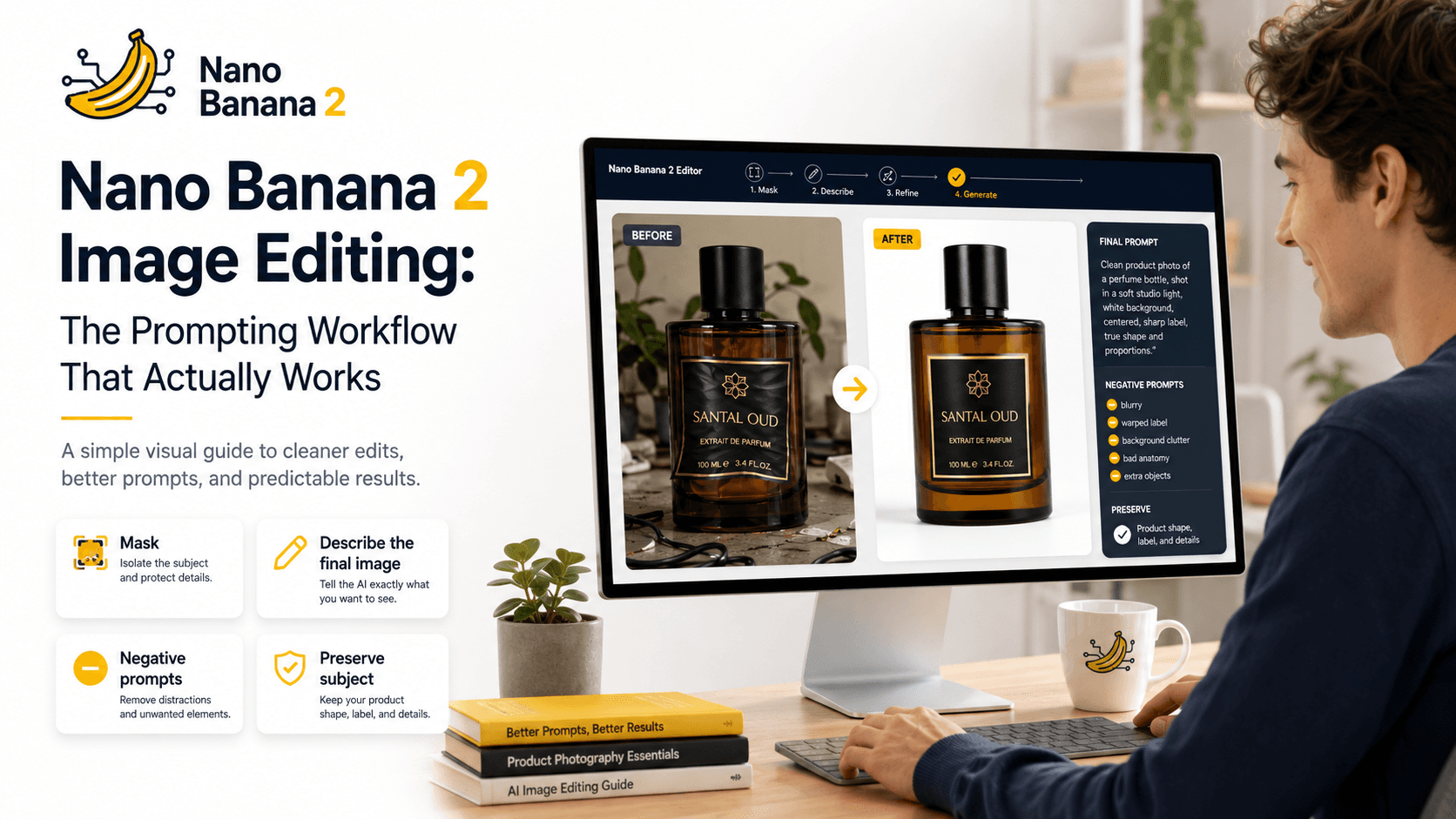
Nano Banana 2 Image Editing: The Prompting Workflow That Actually Works
Last month I was finishing a product mockup for a client — deadline in two hours, needed to swap the background and clean up a label on a bottle. I'd been using Nano Banana 2 for a few weeks at that point, mostly for generation. First time I tried to use it for editing, it nuked the entire composition. The bottle shape changed. The label text warped. The background replacement bled into the subject like watercolor on wet paper.
I spent 40 minutes just getting back to where I started. Not great.
After a lot of trial and error (and one missed deadline, honestly), I figured out exactly why it was doing that — and built a prompt structure that finally made the editing behavior predictable. This is that workflow.
Why Nano Banana 2 Edits "Too Much"
Here's what most tutorials skip: Nano Banana 2 is not a pure inpainting model. Under the hood, it uses a diffusion-based approach that still conditions heavily on the full image context — meaning even when you mask a specific region, the model's denoising process reads surrounding pixel data to generate the edit. If your prompt is too generic or too instruction-like, it interprets the entire image as a canvas to improve, not just the masked zone.
Think of it like telling a contractor "fix the kitchen" versus "replace only the cabinet handles with matte black ones, leave everything else exactly as is." The model, without constraint language, assumes creative latitude.
The second issue is token priority. In Nano Banana 2's prompt parsing, descriptive visual language (colors, materials, lighting adjectives) carries more weight than instructional language. So "change the background to a studio white wall" doesn't work as well as describing the background you want as if you're describing a photograph.
The Exact Workflow: Before and After
Step 1 — Structure Your Mask Context First
Before you write a single word of your prompt, know what you're masking and what you're anchoring. The model needs to understand what's staying, not just what's changing.
This is the difference that fixed everything for me.
Step 2 — Rewrite Your Prompts Around Description, Not Instruction
❌ Bad Prompt (Instruction-based — causes full-image rewrite):
Change the background to a white studio wall, keep the product intact, make the lighting clean and professional.
This tells the model what to do. It interprets this as an editorial directive and often re-generates far beyond the masked area.
✅ Good Prompt (Description-based — surgical edit):
A glass perfume bottle centered on frame, clean matte white studio wall background, soft diffused lighting from the left, no shadows, commercial product photography style, 85mm lens, sharp focus on bottle label.
No instructional verbs. You're describing the final state of the image as if explaining a photograph to someone who's never seen it. The model fills in the masked area to match that description without touching the rest.
Step 3 — Use Negative Prompts Aggressively
Nano Banana 2 responds well to a strong negative prompt specifically scoped to the type of destruction you're trying to prevent.
For background swaps:
[negative]: blurred subject edges, color bleeding, subject deformation, changed product shape, lens distortion, oversaturated
For texture/surface edits:
[negative]: structural changes, altered silhouette, changed proportions, added elements, removed original details, painterly style
Step 4 — Anchor the Subject With Repetition
This one's subtle but it works. If you repeat the key subject descriptor early and late in your prompt, the model's attention stays anchored there:
✅ Better structure:
A glass amber cologne bottle [your edit description here] glass amber cologne bottle, sharp label edges, unchanged form factor.
It sounds redundant reading it back. But it consistently reduces structural drift in my runs.
My Personal Take — Gotchas to Watch For
Mask feathering breaks it at small sizes. If you're working on a small mask (anything under ~200px on a 1024px canvas) and you apply any feathering, Nano Banana 2 tends to expand the edit area and reinterpret adjacent pixels. Keep feathering at zero or near-zero for detail work.
"Photography style" keywords bleed into lighting. Adding terms like cinematic lighting or golden hour to fix a texture issue will often shift the overall image temperature — even outside the mask. Use neutral descriptors (diffused studio light, flat product lighting) when editing, save the cinematic stuff for full generations.
It doesn't handle text-on-surface edits well. If you're trying to change text on a label, sign, or product through prompting alone — don't. The results are garbage nine times out of ten. You're better off masking the entire label as a region and regenerating it completely with the correct text in the prompt, rather than trying to "fix" existing text.
Seed locking matters more than you'd think. If you find a generation that's 90% right, grab that seed and lock it before running your edit prompt. Without a fixed seed, consecutive runs can drift heavily even with identical prompts. This isn't a bug exactly — it's just how the diffusion sampling works — but it catches people off guard.
Conclusion
The core mindset shift is this: stop prompting Nano Banana 2 like you're giving it instructions and start prompting it like you're describing a photo. Once I rebuilt my workflow around that idea — descriptive language, aggressive negatives, subject anchoring — the editing results got predictable fast. It's not perfect. Text editing is still rough, and small masks need careful handling. But for background swaps, surface texture changes, and lighting adjustments, this structure holds up well across different image types.
Written by Raza Hussain — Full-Stack Dev, Aptech IT & SE student, and AI tooling freelancer. Published on AIPromptHub.tech.