Guide
Why AI Generated Faces Look Fake — And How I Fixed Mine
Plastic skin, dead eyes, and subtle wrongness — AI faces fail for a mechanical reason. Here's the exact prompt and workflow fix I use for client-ready portraits.
Published May 3, 2026
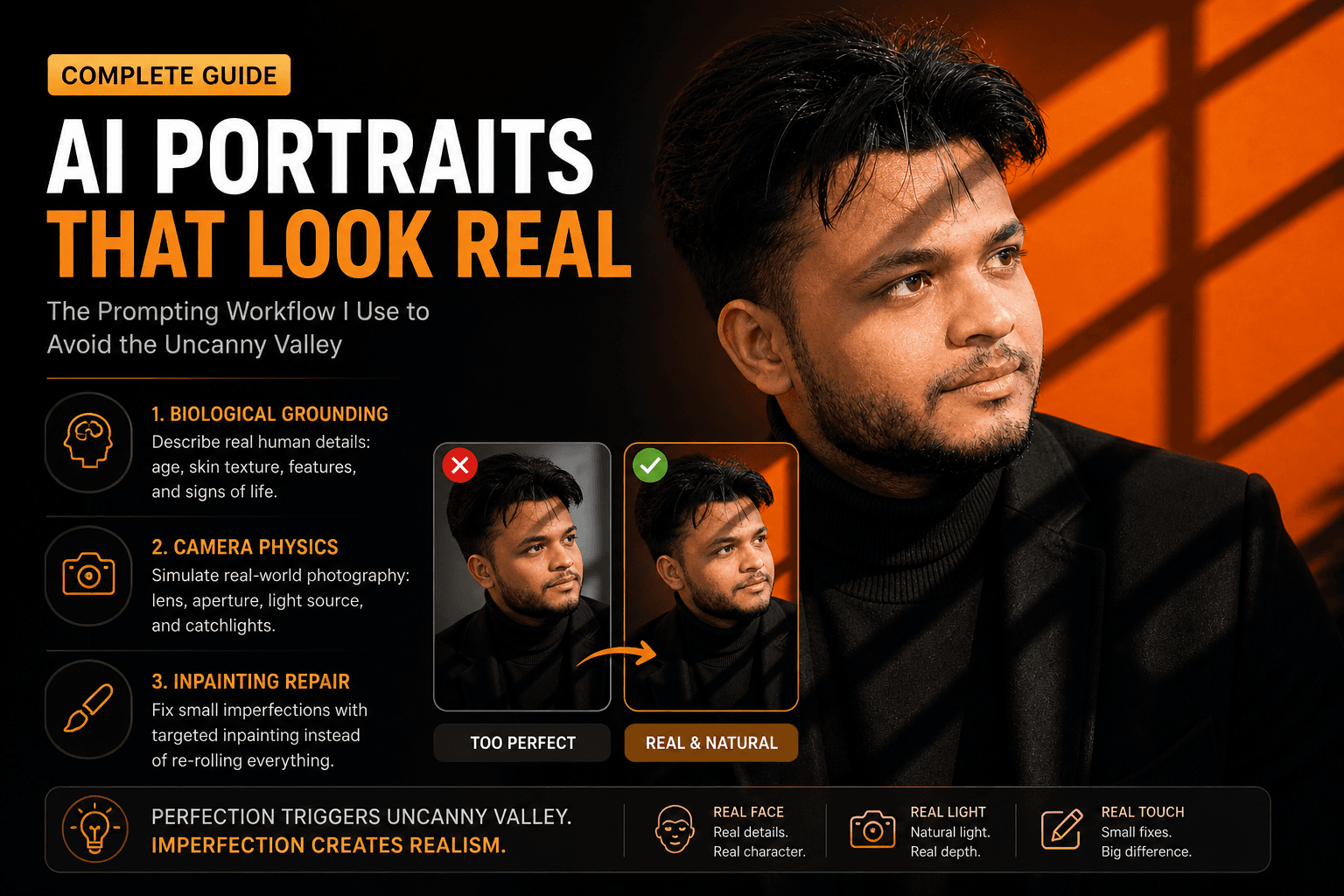
A client on Fiverr sent me a message last month that I had honestly been dreading. She had used my delivered AI portrait for her LinkedIn profile and a colleague told her — in a meeting — that it looked "a bit off." She couldn't articulate why. Her colleague couldn't either. But they both felt it.
I knew exactly what it was. I had rushed the prompt, skipped a few steps in my usual workflow, and handed her something that cleared my personal quality bar without clearing the human quality bar. That distinction matters. A lot.
I spent two days after that running systematic tests to understand — not just feel — what specifically triggers the uncanny valley in AI portraits. Here is what I found and what I changed.
Why the Diffusion Model Gets Faces Wrong by Default
Understanding why this happens is actually more useful than just knowing the fix, because it changes how you think about every portrait prompt you write.
Models like Midjourney use diffusion-based synthesis — trained on billions of images with descriptive captions, the model learns to progressively denoise an image by reversing a corruption process. It is essentially a very sophisticated pattern-matching engine. WaveSpeedAI
The core issue is that this process operates on statistical probability. The model asks: "given these tokens, what pixel arrangement has the highest probability of being correct?" For chaotic natural textures — bark, fabric, stone — that statistical average looks great. But for faces, it is catastrophically bad.
Our brains are wired at a neurological level to read faces. Millisecond-level asymmetries, micro-texture in skin, the specific physics of light on a wet cornea — we process all of this automatically and unconsciously. When an AI generates a face, it blends millions of reference images together, averaging the data. The result strips away the natural human micro-textures that make a face look real. Humai
The model's default bias is toward idealised perfection. Flawless symmetry. Impossibly smooth skin. Eyes that are technically correct but lack the specific, individual light scatter of a real human iris. And that perfection is exactly what triggers the wrongness feeling. Perfection triggers the uncanny valley. Imperfection creates realism. Growing Your Craft
So the fix is not adding more detail. It is adding the right kind of deliberate imperfection.
The Exact Workflow I Use Now
My fix operates at three layers: the biological description, the technical camera simulation, and the post-generation inpainting pass. Most guides cover one of these. You need all three.
Layer 1: Biological Grounding in the Prompt
The single most effective change I made was switching from describing appearance to describing anatomy and lived experience. Stop describing what someone looks like. Start describing their biology and their history.
Bad prompt (generates plastic face):
portrait of a handsome man, professional headshot, photorealistic, high quality, 8K, detailed --ar 4:5
Good prompt (generates a real-feeling face):
close-up portrait of a 38-year-old South Asian man, natural skin texture with visible pores, faint crow's feet at corners of eyes, slightly uneven brow line, subtle dark circles indicating fatigue, short stubble with natural growth pattern, warm ambient window light from camera-right, catchlight visible in left iris, 85mm equivalent, f/1.8 shallow depth of field --ar 4:5 --style raw --hd
The difference in output quality between these two prompts in Midjourney v8.1 is not subtle. It is dramatic.
Specifying distinct age, nationality, and micro-physical details forces the model to abandon its symmetrical beautification routine and render a unique human being rather than a statistical composite. Growing Your Craft
Layer 2: Camera Physics Simulation
Here is something I did not understand when I started: the model is not just generating a face. It is generating a photograph of a face. If you do not specify the photographic physics, it defaults to a technically impossible lighting and optics setup that no real camera would produce.
The fix is to write your prompt like a photographer briefing an assistant, not like a prompt engineer listing adjectives.
Specify:
- Focal length — 50mm and 85mm produce face-accurate lens compression. Wider lenses distort facial geometry and make noses look larger relative to ears.
- Aperture — f/1.4 to f/2.8 produces natural subject separation. f/8+ produces the flat, evenly-sharp look of a bad webcam.
- Light source as a real object —
"single bare strobe from camera-left"or"north-facing window light"produces far more accurate light falloff than"dramatic lighting".
- Catchlights — explicitly requesting
"distinct catchlight in left iris"forces the model to render eye moisture correctly.
Revised prompt integrating camera physics:
environmental portrait photograph, 38-year-old South Asian man in dark structured blazer, 85mm f/1.8, single window light source from right at 90 degrees, warm 4200K temperature, sharp catchlight in right iris, natural skin texture with visible pores and light stubble, slightly uneven brow line, neutral charcoal background, minimal post-processing look, photorealistic --ar 4:5 --style raw --hd
Layer 3: The Inpainting Repair Pass
Even with a strong prompt, about one in four generations will have a face that almost works but fails on eye symmetry or specific skin zones. Re-rolling the entire image at that point is wasteful — you lose a good composition to fix a small area.
Rather than continually re-rolling the entire prompt and losing a perfect background, use Midjourney's Vary (Region) tool to freeze the entire image and ask the model to completely redraw a specific masked area. Growing Your Craft
My exact process: upscale the generation with the good composition but bad face region → use Vary (Region) → mask only the problematic area (usually a single eye or the skin around the nose) → re-run with a tighter, anatomy-specific prompt focused only on that region. The stitch quality in v8.1 is clean enough that you typically cannot see the edit boundary.
Real-World Gotchas — My Personal Take
A few things that still trip me up even with this workflow:
Teeth are still the hardest problem. Any prompt that shows a subject smiling has about a 40% failure rate in my experience. The model regularly generates fused teeth, incorrectly proportioned gums, or teeth that do not match the jaw structure. I now either specifically prompt for "mouth closed, contemplative expression" or budget an inpainting pass specifically for the mouth.
--style raw changes everything, but not always for the better. Raw mode disables Midjourney's aesthetic post-processing, which is great for realism but means the model's baseline rendering is more exposed. Weak prompts on --style raw produce worse results than on the standard setting. Use it only when your prompt is already detailed.
HD mode (--hd) and --q 4 together cost 16× GPU time based on current v8.1 pricing. For client work where quality is the priority, absolutely worth it. For iteration and testing, run standard SD mode until you have a composition you like, then run HD as a final pass.
Older Midjourney v6 prompts do not port cleanly to v8.1. I had an entire tested prompt library that I had to revise when v8.1 dropped. The model's improved prompt adherence means that previously vague-but-functional prompts now render hyper-literally, exposing gaps in the original descriptions.
Conclusion
The uncanny valley in AI portraits is not a model limitation you work around — it is a prompt precision problem you solve. Once you understand that the model is rendering a statistical average of training data, and that your job is to constrain that average with specific biological and photographic details, the outputs change fundamentally.
If you want to see tested portrait prompts that already have this specificity baked in, the AIPromptHub gallery has examples documented with their expected outputs — a good baseline to adapt rather than reverse-engineer from scratch. Write precisely, specify the physics, and add the imperfections deliberately. That is the whole fix.