Guide
Why Your Midjourney Prompts Fail on Flux (And How to Rewrite Them So They Work on Both
Midjourney and Flux process prompts in fundamentally different ways. Here's the exact rewriting framework I use to make one prompt work brilliantly on both models.
Published May 2, 2026
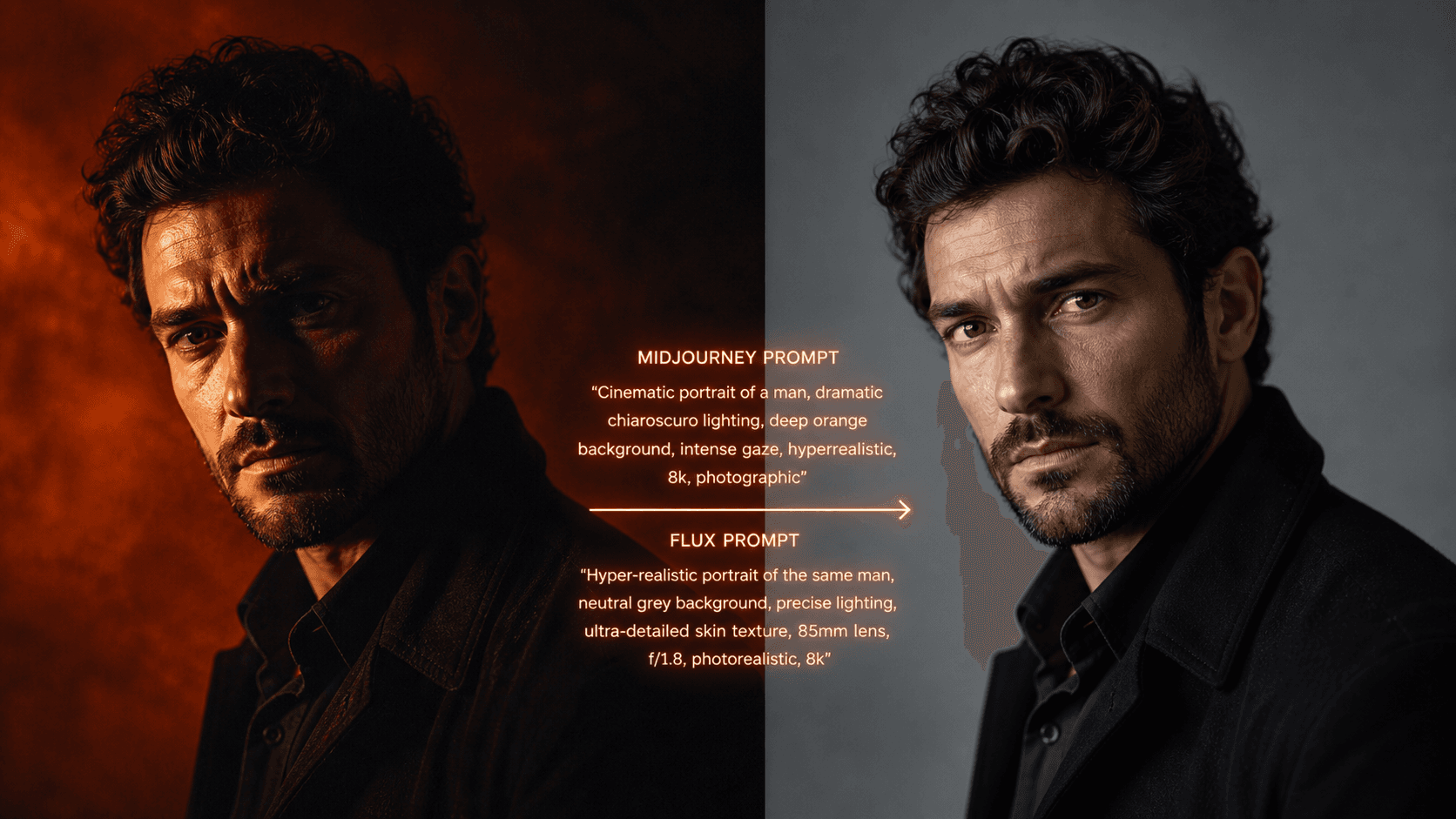
I wasted an embarrassing amount of credits in early 2026 doing what I assumed was the logical thing: I took my best-performing Midjourney prompts — the ones I had spent months refining — and pasted them straight into Flux 2 Pro. The results were consistently bad. Not broken, just... wrong. Flat compositions. Missed spatial relationships. Lighting descriptions that Midjourney would have interpreted beautifully, rendered by Flux in a way that looked like a competent but uninspired stock photo.
It took me about two weeks of systematic testing to understand why. And once I did, I rewrote my entire prompt library.
The Fundamental Difference Nobody Explains Clearly
Midjourney and Flux are not interchangeable tools that produce the same output from the same input. They have completely different relationships with your text.
Midjourney interprets. When you write "dramatic side lighting," Midjourney pulls from its aesthetic training to produce something that feels dramatically lit — often beautifully so. It has opinions. It will override vague instructions with confident creative choices. This is the feature that makes Midjourney exceptional for editorial and fine art work, and it is also the exact reason your Midjourney prompts fail on Flux.
Flux obeys. When you write "dramatic side lighting" in Flux, it tries to execute that instruction literally. With no further physical specification, "dramatic" is underspecified, and you get something technically adequate and visually inert.
The gap is not about quality. It is about architecture. Flux rewards precision and punishes ambiguity in ways Midjourney simply does not.
The Three Prompt Elements That Break Across Models
Through my testing, I identified three specific areas where prompts written for Midjourney consistently fail on Flux:
Emotional or aesthetic adjectives used as lighting instructions. Words like "dramatic," "moody," "cinematic," or "ethereal" work in Midjourney because its training data associates those words with specific visual treatments. Flux treats them as vague modifiers and hedges toward the mean.
Implicit composition instructions. Midjourney understands compositional shorthand — "headshot," "environmental portrait," "three-quarter view" — and applies sensible defaults around them. Flux needs explicit spatial coordinates: where is the subject in the frame, what is the camera angle, what focal length is implied.
Style reference syntax. Midjourney's --sref and --cref flags have no equivalent in Flux. If your entire prompt strategy relies on style or character reference images, that approach will not port at all.
The Rewrite Framework: From Midjourney to Flux
Here is the exact process I follow when I need a prompt to perform well on both models without maintaining two entirely separate libraries.
Step 1: Replace aesthetic adjectives with physical descriptions.
Instead of dramatic lighting, write single hard light source positioned 45 degrees camera-left, casting a sharp shadow falling diagonally across the right cheek, no fill light.
Instead of cinematic atmosphere, write anamorphic lens compression, subtle horizontal lens flare, film grain at ISO 800 equivalent, slightly desaturated shadows.
Step 2: Make every spatial relationship explicit.
Instead of close-up portrait, write tight head-and-shoulders crop, subject centered in frame, camera at eye level, 85mm focal length equivalent.
Step 3: Specify the light source as a real-world object.
Flux responds extremely well to photography-literate source descriptions. Words like bare strobe, window light from the right at 90 degrees, practical lamp in background at 2700K, or overcast north-facing skylight give Flux enough physical information to render lighting with genuine accuracy.
Here is a before-and-after example from my own workflow:
Original Midjourney prompt (works well there, fails on Flux):
Dramatic cinematic portrait of a woman, moody atmosphere, dark background, high fashion aesthetic, intense expression --ar 4:5 --style raw
Rewritten for Flux 2 Pro (and also still functional on Midjourney):
Professional close-up portrait photograph, woman in dark ribbed turtleneck, single hard key light from camera-left at 45 degrees, sharp diagonal shadow across right side of face, no fill, deep neutral-grey seamless background, 85mm f/1.4 shallow depth of field, skin texture visible, neutral color grade, contemplative forward gaze, photorealistic --ar 4:5
The second prompt is longer, but every additional word is doing physical work. On Midjourney, it produces a controlled, technically precise result. On Flux 2 Pro, it produces something indistinguishable from a studio photograph.
One Prompt Library, Two Models
The practical takeaway from all my testing is this: write at Flux's level of specificity, and the prompt will still perform well on Midjourney. Write at Midjourney's level of interpretive shorthand, and Flux will consistently underdeliver.
Treating physical precision as your default standard does not constrain Midjourney — it simply removes the creative guesswork from Flux.
If you want to see this framework applied across a range of prompt categories — portraits, product photography, architectural shots, cinematic stills — the AIPromptHub gallery has tested examples for each major model, with the expected output documented alongside every prompt. It will save you the two weeks of credit-burning trial and error I went through.
Write precisely. Both models will thank you.