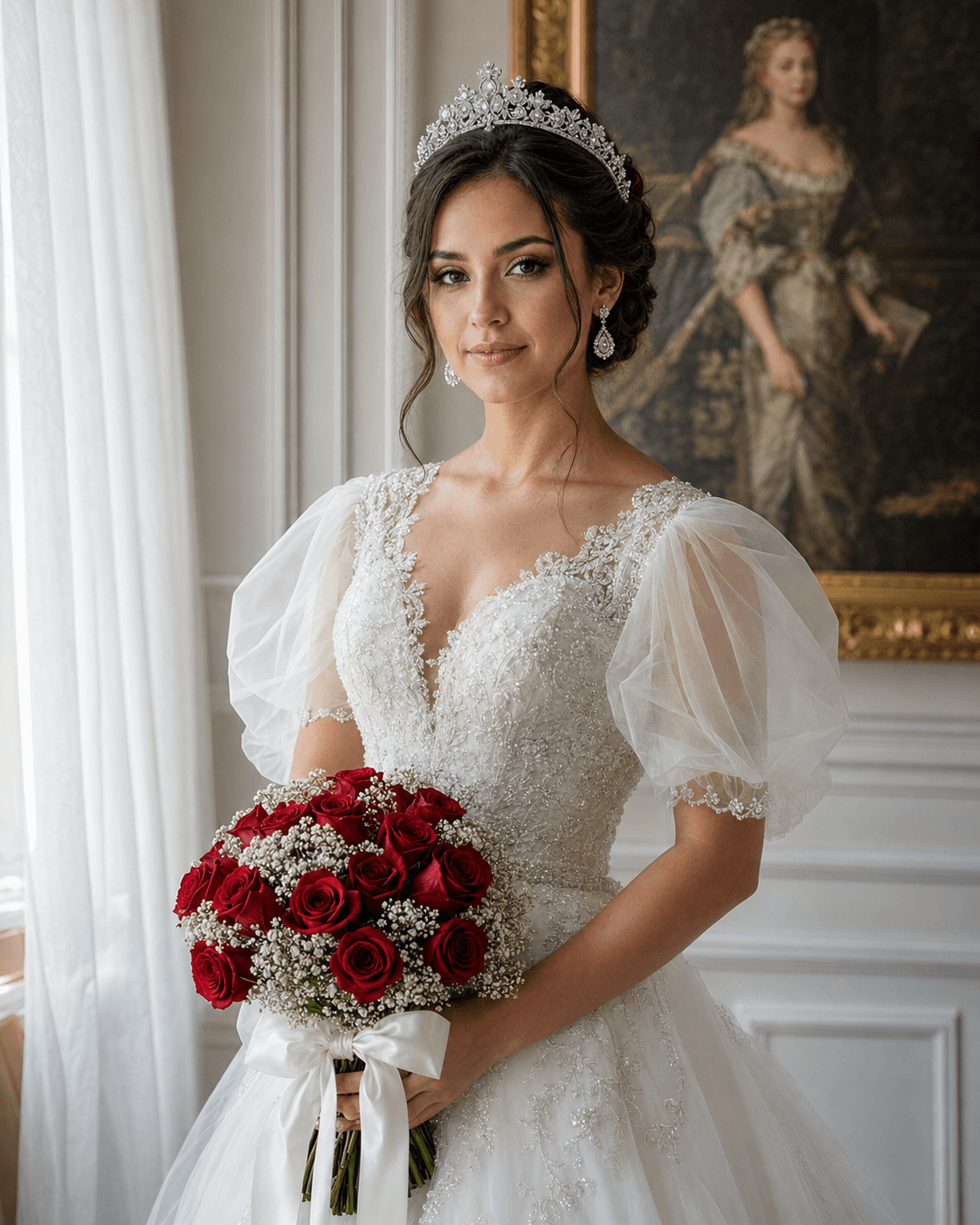
Photorealistic Wedding Portrait AI Prompt for Professional Bridal Photography
This photorealistic wedding portrait prompt captures soft side-lit bridal elegance with lace gown detail and crystal tiara — built for professional-grade AI photography output. Feed in a face reference and the classical interior handles the rest
I kept losing the wainscoting detail whenever I pushed resolution — Midjourney just softened it out. Writing 'clearly visible' for the framed painting fixed most of that. The organza sleeves also needed both 'voluminous' and 'sheer' together, or the fabric rendered as a flat white mass. Worth the extra tokens to be specific.
Tags
Prompt
Expected Output
The output is a medium close-up bridal portrait bathed in soft, diffused side light from a suggested window source. White-paneled walls with detailed wainscoting and a large framed oil painting provide clean classical framing in the background. The lace bodice and organza puff sleeves render with visible fabric transparency and structure. The crystal tiara catches ambient light naturally, and the red rose bouquet creates a sharp color accent against the otherwise neutral palette. Technically, the scene's descriptor specificity pushes the model away from the generic white-dress blur that plagues vague bridal prompts. Separate fabric labels for lace, organza, and satin ribbon force distinct texture rendering per element rather than one homogenized surface. Bokeh is naturally implied by the medium close-up framing and background depth — the AI wedding photography generator handles focus falloff without an explicit instruction. In my workflow, this pairs best with a face reference for bridal boutique clients who want a styled mockup before committing to a shoot day.
- Medium close-up framing naturally suits portrait prints, digital display, and studio portfolio mockup use
- Face-reference instruction locks subject likeness across lighting and expression conditions within the scene
- Red rose bouquet creates a deliberate color contrast against the neutral bridal palette without oversaturating
- Organza puff sleeves render with visible sheer layering and volume, not as a collapsed white surface
- Wainscoted classical interior stays contextually sharp in the background without competing with the subject
- Crystal tiara catches ambient light naturally without appearing over-exposed or artificially metallic
- Soft, directional side light renders lace and organza textures with photographic depth rather than flat white
Parameters & Variables
| Variable Token | Meaning | Examples | Effect |
|---|---|---|---|
| FACE REFERENCE INPUT | The reference image used to match the portrait subject's face and likeness | pre-approved character sheetstock portrait referencepersonal selfieclient upload photo | Changing this input swaps the subject identity entirely while all attire, accessories, and setting remain locked as specified |
| BOUQUET FLOWERS | The specific flower type and color in the held arrangement | lavender and eucalyptusivory calla lilieswhite peoniesblush garden roses | Shifts the color accent point and seasonal register of the composition — red roses read formal and classic; pastels read spring and romantic. |
| GOWN STYLE | The silhouette, neckline, and structural details of the wedding dress | A-line with cap sleeves, off-shoulder ballgown, fitted slip dress, deep V-neck with sheer overlay | Dramatically changes the era, formality level, and editorial mood of the full portrait. |
| BACKGROUND SETTING | The interior architecture and environment behind the subject | baroque gilded ballroommodern minimalist studioivy-covered garden greenhousestone chapel interior | Repositions the entire aesthetic context and era implied by the scene. |
| LIGHTING QUALITY | The quality, temperature, and direction of light hitting the scene | dramatic Rembrandt split lightingwarm candlelight glowovercast soft window lightgolden hour side light | Shifts mood from romantic and editorial to intimate or high-contrast — the single variable with the widest emotional range. |
Pro Tips / Best Practices
- Who Should Use This: Wedding photographers building AI-assisted client consultation decks, bridal boutique owners generating style-specific lookbook imagery, and Etsy print sellers producing downloadable bridal wall art. The face-reference instruction makes this specifically strong for portrait studios wanting to show a client exactly how they'd look in a specific gown style before booking.
- 💬 My Personal Take: Don't trim the "Critical instruction" block at the end — I know it looks redundant, but it's doing real work. Every time I've tested a stripped version, the model drops the wainscoting, simplifies the tiara, or crops the bouquet. Leave every element instruction in. The verbosity is intentional.
- 🎛️ Customize It: Swap the red roses for seasonally appropriate flowers — blush peonies for spring, ivory ranunculus for winter — to match your actual client's arrangement and make the mockup feel personally tailored rather than stock.
- 📐 Aspect Ratio Guide: Use 2:3 for print products and digital wall art. Use 4:5 for Instagram delivery. Avoid square crops — they cut the bouquet placement awkwardly and lose the lower third of the gown.
- 🔁 Iterate Fast Run: 3–4 batches varying only the lighting descriptor while keeping everything else identical. It gives clients a direct style comparison — soft editorial vs. golden warm — without introducing uncontrolled variables.
Related Prompts
Stunning Golden Mirror Portrait That Looks Like a Real Photoshoot
DALL-E 3 • Fashion
Photorealistic Cherry Blossom Portrait AI Prompt for Dreamy Aesthetic
DALL-E 3 • Cinematic
Realistic Cinematic Portrait AI Prompt with Roses Aesthetic
DALL-E 3 • Realistic

Ultra-Realistic Cinematic Golden Hour Travel Portrait
DALL-E 3 • Realistic