ai-action-figure-3d-render-prompt
Flux•3D Render
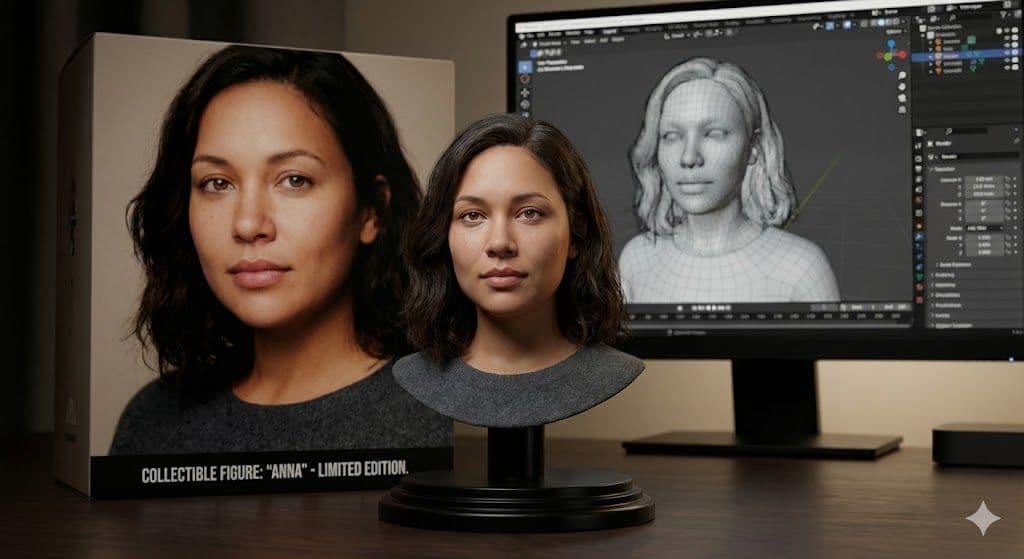
This AI collectible figure prompt produces photorealistic toy-style character renders with packaging, macro lighting, and precise facial detail replication.
Tags
Ai ArtCharacter Designhyperrealistic3d RenderCollectible Figure
Prompt
Expected Output
- Hyper-accurate facial preservation adapted into realistic collectible figure material finish
- Macro photography depth of field isolating subject with smooth background blur
- Premium PVC or resin texture simulation with glossy surface realism
- Cinematic indoor lighting producing soft shadows and volumetric atmosphere
Parameters & Variables
| Variable Token | Meaning | Examples | Effect |
|---|---|---|---|
| SUBJECT_IMAGE] | The reference face or character being transformed into a collectible figure | portrait photoselfie imagecharacter artworkclient headshot | Determines identity accuracy and overall likeness of the generated figure |
| MATERIAL_TYPE | Controls the surface finish of the collectible figure | glossy PVCmatte resinpainted plastic | Changes how light interacts with the figure, affecting realism and product feel |
Pro Tips / Best Practices
- 🎛️ Customize It: Try swapping the packaging design with brand logos or color themes to instantly convert this into a client-ready product mockup concept.
- 📐 Aspect Ratio Guide: Use square (1:1) for eCommerce-style product shots and vertical (4:5) for Pinterest posts to maximize visual engagement and saves.
- 💡 Workflow Tip: After generating in Midjourney or DALL·E, enhance sharpness and contrast slightly in Photoshop to achieve true commercial-grade polish.
- Output Optimization: Export high-resolution versions for use in portfolios, mock product listings, or even print-ready promotional materials.