reference-matched-chiaroscuro-portrait-flux-photographers
A cinematic chiaroscuro portrait AI prompt engineered around single-source dramatic rear backlighting, deep shadow contrast, and analog film grain — delivering fine art headshots with the feel of a high-end studio shoot, without one
"Flux kept blowing out the lit cheek entirely — I had to force 'high dynamic range' AND 'low-key' together in the same prompt before it stopped flatting the shadow gradient. Also had to push 'dust motes' explicitly or the background just rendered as a plain black void. Once both clicked, the halo came through really naturally without needing a second pass.
Tags
Prompt
Expected Output
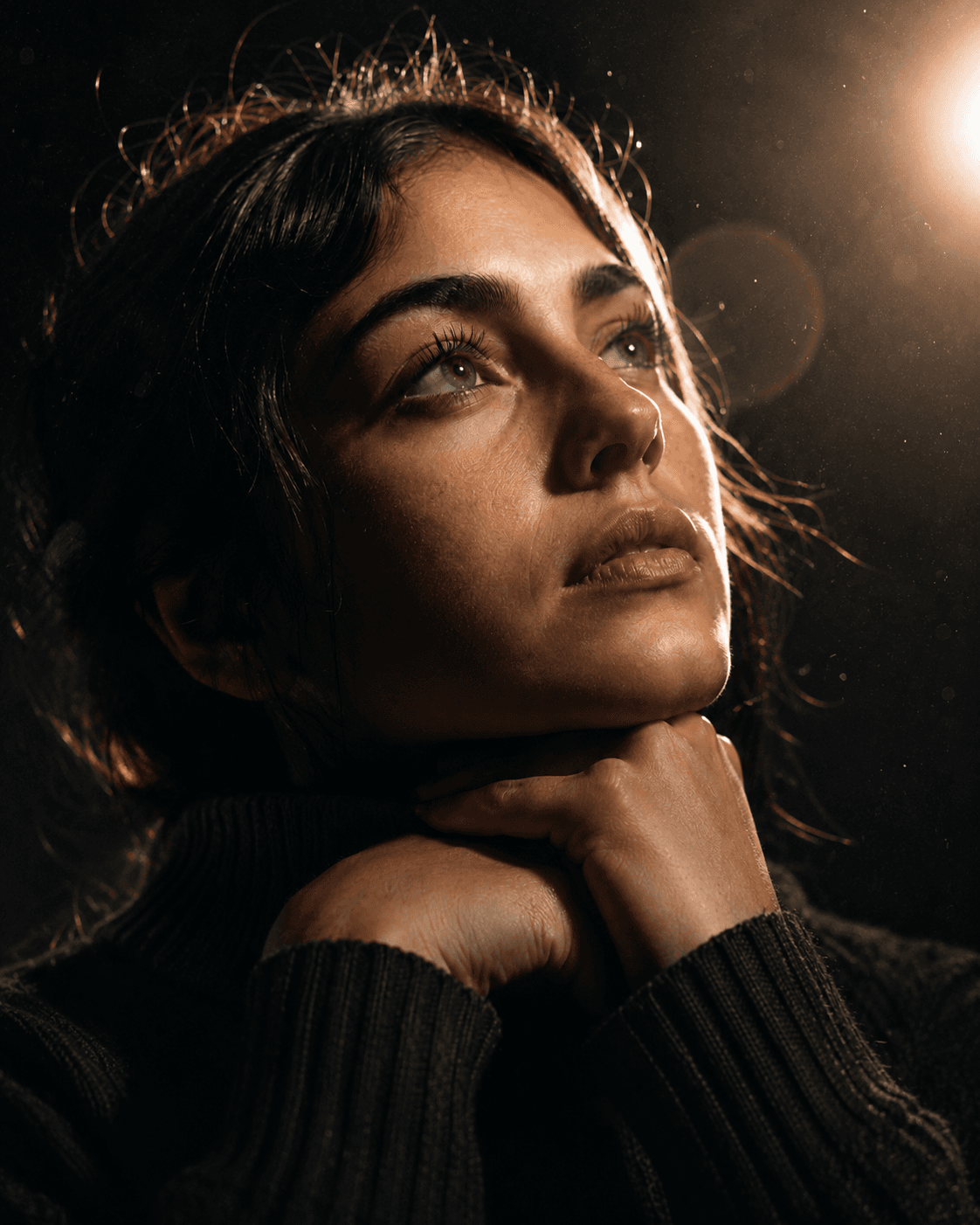
The image centers on a face sculpted by a single rear-right light source that cuts across the subject's features with real authority. One side catches a bright, warm specular highlight; the other recedes into rich, near-black shadow — the transition is sharp and intentional, not gradual. A visible lens flare and soft halo ring the light source from behind, and the dark background shimmers with floating dust motes and analog film grain. The subject's hands rest under the chin, gaze lifted slightly — the pose is still, but the lighting makes it feel like a held breath. Flux handles this prompt's logic well because the chiaroscuro instruction forces HDR-style tonal separation — bright highlights and crushed blacks coexist without the model flattening midtones into grey mush. The film grain and dust motes render as intentional surface texture rather than noise artifacts, which keeps the low-key portrait photography AI output looking like a deliberate choice rather than a degraded file. The dark turtleneck absorbs light correctly, grounding the image in a tactile, physical reality.
- Contemplative hand-on-chin pose locks in a consistent, repeatable composition across multiple generations
- Dark turtleneck fabric renders with accurate texture weave, anchoring the fine art quality
- Reference-image structure preserves facial identity, making outputs usable for real client-facing work
- Dark low-key background isolates the subject cleanly, with zero competing visual distraction
- Film grain and floating dust motes render as intentional analog texture, not digital noise artifacts
- Visible rear lens flare and backlight halo add cinematic depth without any compositing work
Parameters & Variables
| Variable Token | Meaning | Examples | Effect |
|---|---|---|---|
| LIGHT DIRECTION | Controls the horizontal angle of the key light source relative to the subject's face | overhead hatchlightfront-45-degree Rembrandthard side-leftrear-right | Shifting the light angle restructures which half of the face falls into shadow, completely changing the portrait's mood and drama level. |
| BACKGROUND TEXTURE | Defines the environmental quality of the dark background zone | crushed velvetconcrete texturesmoke and bokehdust motes and film grain | Background texture determines whether the image reads as analog cinematic, studio-clean, or gritty — a significant tonal shift even when the subject stays identical. |
| CLOTHING DESCRIPTOR | The garment worn by the subject, which absorbs or reflects light and anchors the portrait's register | bare shouldersblack leather jacketwhite linen shirt | Light-colored garments reflect fill into the shadow side and soften contrast; dark garments maintain the low-key isolation and push the face forward as the sole focal point. |
| POSE / GAZE | The subject's physical positioning and direction of focus | eyes closedprofile view downwarddirect gaze into lenshands on chin looking upward | A direct gaze creates confrontational energy; the upward/sideways gaze in this prompt reads as introspective — swapping it restructures the entire emotional register of the portrait. |
| LENS FLARE INTENSITY | How prominent and visible the backlight flare and halo effect render | multi-ring anamorphic flareclean backlightno flareprominent bright halo | High flare intensity adds cinematic spectacle and drama; removing it shifts the image toward clean editorial — both are valid, but they target different use cases. |
Pro Tips / Best Practices
- Who Should Use: Portrait photographers, headshot studios, Etsy print sellers, album cover designers, and film/TV concept artists can use this prompt for AI-assisted mood boards, client-based fine art portraits, and cinematic lighting references where preserving the exact face and identity matters more than creating a generic portrait.
- 💬 My Personal Take: The identity-preservation language works cleanly in Flux but genuinely confuses DALL-E 3 — it tends to average the face toward a generic type within a few generations. Also: if your shadow side isn't staying dark enough, add the phrase "no fill light, no ambient bounce" explicitly. The AI's default instinct is to soften everything, and you have to actively override it.
- 🔁 Iterate Fast: Run at least 4–6 seeds before committing to a final output. The lens flare position and halo spread shift naturally between generations — some land dramatically better than others, and the difference between a mediocre hit and an exceptional one is often just the next seed.
- 📐 Aspect Ratio Guide: Keep portrait orientation (4:5 or 2:3 in Flux/MJ) for any print-ready output. Landscape crops cut off the shadow gradient on the lower face, which kills the low-key composition logic this entire prompt is built around.
- 🎛️ Customize It: Swap the rear-right position to a direct side-split for a classic Rembrandt look, or push it to full backlight-only if you want a near-silhouette with just rim definition. Either direction stays within the low-key portrait photography AI aesthetic without losing the core mood.