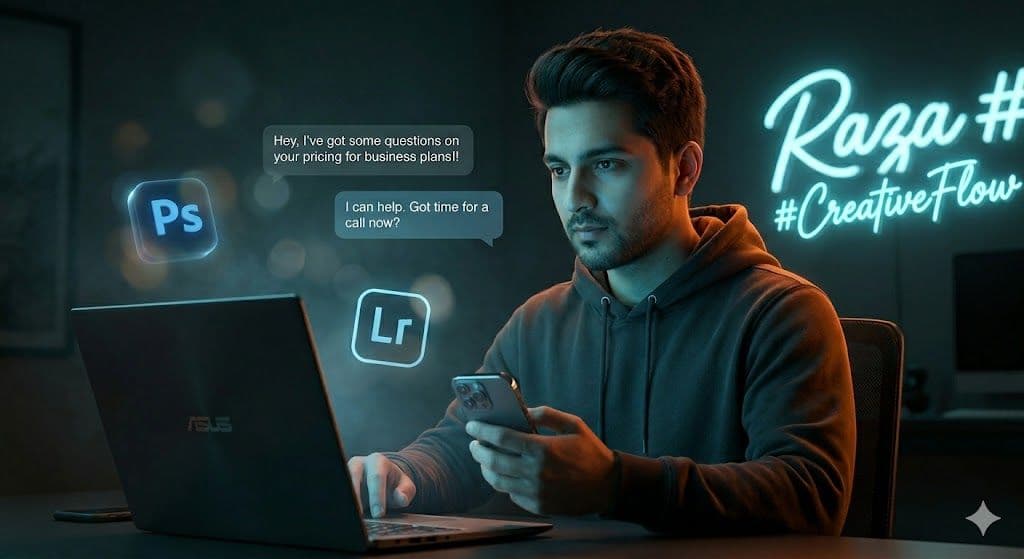
InstantID Prompt for Branded Creator Headshot with Cinematic Teal-Orange Grade and Floating UI Elements
A meticulously engineered stable diffusion cinematic portrait prompt that locks facial identity to a reference image while placing the subject inside a neon-drenched, teal-and-orange graded digital creator scene.
Tags
Prompt
Expected Output
This prompt generates a medium-shot portrait of a male subject seated at a technology workstation, rendered at 8K with photorealistic skin texture. The teal-and-orange cinematic color grade dominates — a cool neon blue splits the face from one side while a warm amber rim light defines the hoodie silhouette and hair. Deep depth of field pushes the background into a soft, moody blur, drawing focus sharply to the eyes. Semi-transparent 3D glowing icons of Adobe Photoshop and Lightroom float in the midground, and two clean chat-bubble UI elements appear suspended in air, reinforcing the digital-native atmosphere. The technical output relies on ray-traced reflections on the laptop and smartphone screen, high-fidelity strand-level hair detail, and facial mapping that preserves exact bone structure — making this well-suited for InstantID or IP-Adapter FaceID pipelines within Stable Diffusion. The structured layering of subject, scene, and technical specs allows the model to process identity and environment as independent but coherent layers, reducing facial drift.
- Structured prompt architecture (Subject / Scene / Technical) reduces compositional ambiguity and increases output consistency across generations
- Deep DoF separation cleanly isolates the subject from the dark studio environment for professional editorial framing
- Ray-traced reflections on the device screens elevate perceived photographic realism beyond standard diffusion outputs
- Neon split lighting — cool key light on the face, warm orange rim on the hair — creates strong dimensional contrast at medium shot
- Floating 3D icon overlays (Adobe Ps + Lr) add layered graphic depth without overwhelming the portrait composition
- Teal-and-orange cinematic grade replicates the Hollywood dual-tone look used in blockbuster color pipelines
- Locked facial identity via advanced face-matting ensures bone structure, eye shape, and skin pores match the reference photo exactly
Parameters & Variables
| Variable Token | Meaning | Examples | Effect |
|---|---|---|---|
| SUBJECT NAME / REFERENCE IMAGE | The identity anchor — the named person and uploaded reference image the AI maps facial geometry from | professional headshot referencePersonal selfie upload | Swapping the reference image entirely changes the portrait subject while preserving all lighting, composition, and scene logic |
| COLOR GRADE | The dominant cinematic color treatment applied to the full frame | Moody DesaturatedTeal and OrangeGolden Hour Warm, High-Contrast Black and White | Alters the entire emotional atmosphere — teal/orange reads cinematic and futuristic, warm-only reads earthy and approachable |
| FLOATING ICONS | The semi-transparent 3D graphic elements hovering in the scene midground | CapcutAdobe PsLrFigmaNotionVS CodeGitHubCanva | Changes the perceived professional niche of the subject — Adobe icons signal creative/photography, coding tools signal developer persona |
| CHAT BUBBLE TEXT | : The UI text elements appearing in the air as conversational overlays | testimonial messageproject brief snippetDM cold pitch exchangeClient pricing inquiry + response | Adds narrative context to the scene, turning a portrait into a storytelling asset for service-based brand marketing |
| NEON SIGN TEXT | The backlit glowing sign text displayed on the rear studio wall | Personal name or handlebrand taglineagency namemotivational word | Personalizes the background into a branded asset — changing this text makes the same scene work for any creator's identity |
| --ar (if Midjourney) / width:height ratio (if SD) | Controls the output canvas aspect ratio | 2:3 (portrait/print)9:16 (Reels/Story)1:1 (Instagram post)16:9 (YouTube thumbnail) | Determines crop and composition framing — taller ratios give more headroom for the neon sign; wider ratios suit banner or cover use |
Pro Tips / Best Practices
- 🎛️ Customize It: Replace the Adobe Ps/Lr floating icons with tools specific to your niche — use Figma + Webflow for UX designers, VS Code + GitHub for developers, or CapCut + TikTok for video creators. This single swap repositions the entire portrait for a different professional audience without rewriting the scene.
- 🔁 Iterate Fast: When using InstantID or IP-Adapter FaceID in ComfyUI, run your first 4–6 generations at 512×768 with a CFG scale of 6–7 to find your best seed. Only upscale to 8K via Hires.fix or Tiled Diffusion once you have a seed that nails the facial mapping — this saves significant generation time.
- 📐 Aspect Ratio Guide: For LinkedIn banners or Instagram carousels, crop this prompt's output to 16:9 or 4:5 respectively. The deep-DoF background and dark studio environment make this image highly crop-friendly — the subject reads clearly even when significantly trimmed from the sides.
- 🎨 Style Pairing: This prompt pairs exceptionally well with a Cinematic SDXL LoRA (e.g., CinematicKX or Realism Engine) loaded at 0.7–0.85 weight. Avoid full-weight LoRA loading as it can override the face-preservation signals from your IP-Adapter.
- 💡 Workflow Tip: Export the final output as a layered PSD mockup by running the image through Adobe Firefly's Generative Fill to refine the chat bubble typography — the clean, dark background makes text masking trivial and turns this AI portrait into a fully production-ready brand asset.
Related Prompts
High Fashion AI Portrait Prompt with Geometric Shadow Lighting
Nano Banana • Fashion

AI Prompt for Executive Identity Portrait: Navy Suit, Scissor-Door Supercar, Cityscape Background
Nano Banana • Photography
Realistic Cinematic Portrait AI Prompt for Professional Modern Fashion Photography
Nano Banana • Photography
Photorealistic Duality Horror AI Prompt for Dark Fantasy Game Concept Art
Nano Banana • Dark / Moody